Direct answer: An EtherNet/IP cabinet succeeds on disciplined infrastructure, not protocol tricks: a managed switch with IGMP snooping, a star or ring topology, and clean grounding with segregated cabling. Get those three right and the CIP multicast traffic stays contained and reliable.
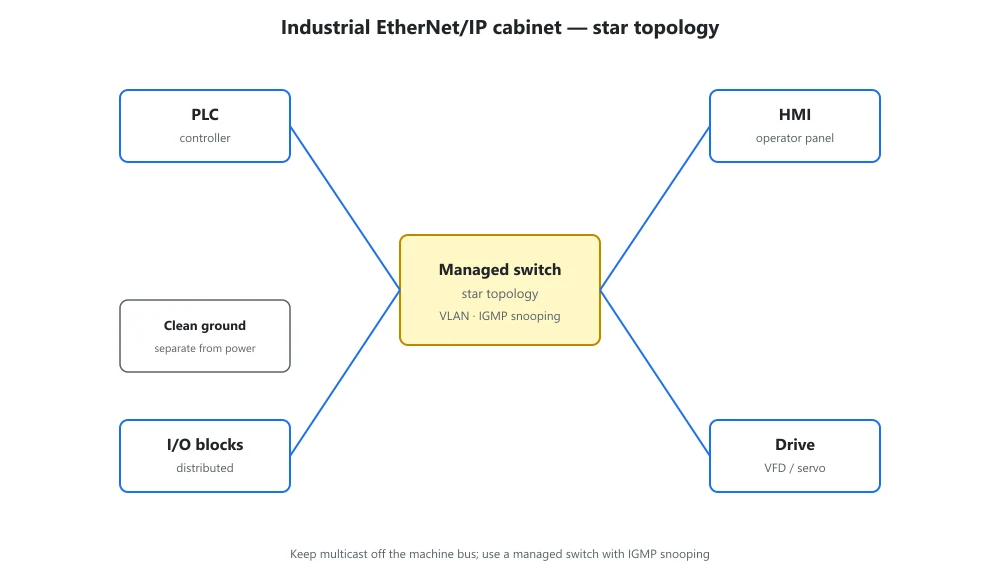
Core rules for an EtherNet/IP cabinet
Choose a managed switch with IGMP snooping
Use a managed switch that supports IGMP snooping so multicast traffic from I/O and motion devices is forwarded only to ports that subscribed to it. Without snooping, a single implicit-message burst floods every port and steals bandwidth from the controller. This is the single most common cause of intermittent EtherNet/IP dropouts.
Star or ring, never a long daisy chain
Build a star from the switch, or a ring using DLR (Device Level Ring) so a single cable break reroutes in milliseconds. Avoid long linear daisy chains of devices: a break in the middle partitions the network and is hard to troubleshoot. Keep cable runs short and document port assignments.
Segregate and ground before you cable
Separate safety (CIP Safety) and high-speed motion onto their own VLAN or physical network, and keep signal and power cabling apart. Bond the cabinet and shield drains to a single ground point to kill noise that otherwise shows up as CRC errors. Sort segregation and grounding on paper before the first cable is pulled.
Cabinet layout checklist
- Managed switch with IGMP snooping at the backbone (not an unmanaged desktop unit)
- Star off the backbone or ring with a recovery protocol; never a long daisy chain
- Keep signal cables at least 200 mm from VFD and contactor wiring; bond frame and DIN rail to one ground bus
When the cabinet bridges Profibus or Modbus legacy devices into the IP backbone, our protocol converters and fieldbus gateways handle the translation without another controller. The PLCs on the backbone remain the orchestrators.
EtherNet/IP cabinet FAQ
How many devices can one EtherNet/IP switch support?
It depends on the switch and the traffic profile, but a typical managed industrial switch comfortably handles 20 to 50 nodes of implicit I/O plus a few explicit-message clients. The real limit is multicast load and scan rate, not the port count, so size from your connection count and update interval, not from the number of RJ45 jacks.
Do I need a separate network for safety?
Not strictly. CIP Safety rides the same EtherNet/IP physical network with its own certified telegram, so many plants run safety and standard traffic on one infrastructure. A separate VLAN or physical network is worth it when a fault on the standard side must never touch a safety node, or when motion traffic would otherwise saturate the link.
Related reading: Send PLC data to MQTT or cloud without logic changes