
Product Specifications
- Brand
- CNC-STEP
- Part Number
- KinetiC-NC
- Product Type
- CNC Control Software
- Platform
- Windows (XP/Vista/7/8/10)
- Max Axes
- 6 simultaneous
- Step Frequency
- 1.6 MHz per axis
- PC Connection
- Ethernet (RJ45) via CnCPod Hardware Module
- File Formats
- G-Code (DIN ISO), DXF, STL
Product Description
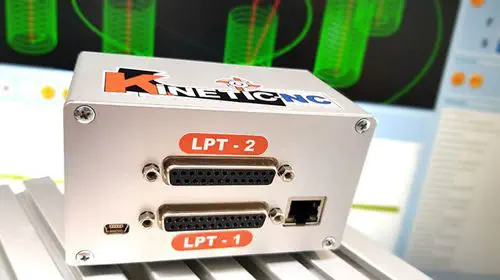
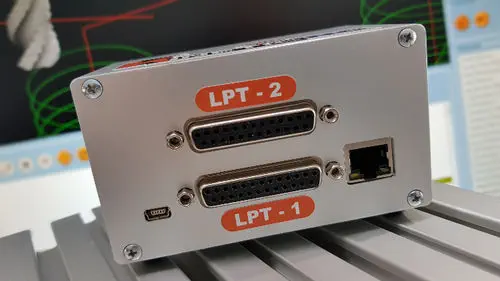
KinetiC-NC is a Windows-based CNC control software package developed by CNC-STEP for milling, engraving, and cutting machines with up to 6 interpolated axes. Unlike USB- or parallel-port-based controllers, it pairs with an external CnCPod hardware module—a 32-bit, 8-core independent processor connected via shielded Ethernet—that handles all path calculation, acceleration ramps, and signal generation autonomously. This architecture means the control PC is not a single point of failure: machining survives PC crashes, power loss, and network disconnection without scrapped workpieces.
How does the CnCPod protect workpieces during PC failure?
The CnCPod runs its own real-time motion processor independent of Windows. If the PC blue-screens, loses power, or the Ethernet cable is pulled mid-job, the CnCPod continues executing the current motion buffer, brakes the machine safely along the programmed deceleration ramp, and holds position. When the PC reconnects and KinetiC-NC restarts, the operator resumes machining from the exact stopping point—zero lost steps, no re-referencing required. This buffer-underrun protection is a standard feature, not an add-on.
What machine hardware does KinetiC-NC support?
All CNC-STEP machine types are pre-configured with plug-and-play parameter sets—select the machine model during installation and begin cutting immediately. KinetiC-NC supports automatic tool changers with up to 20 stations, PWM spindle control (0–10 V output), automatic rotation axes including tangential knife control, handwheel (MPG) input, and optional touchscreen operation. Industrial offset management via G54–G59 coordinate systems and a parking position is built in, as is backlash compensation for mechanically worn machines.
How does the 3D simulation and track preview improve machining?
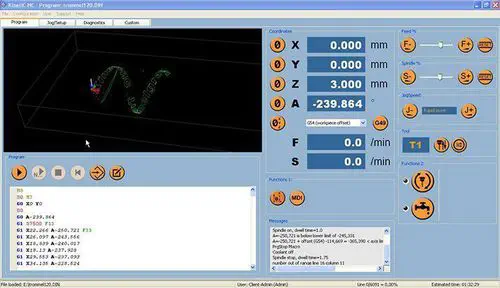
KinetiC-NC renders the toolpath as a 3D graphical preview with milling presentation before cutting begins, allowing the operator to visually verify the program. During execution, a track-preview algorithm with jerk limitation and adjustable lateral acceleration automatically adjusts feed rates through curves to maintain smooth motion and consistent surface finish. The interpolator reduces jitter at the hardware level—clock ratio is always 50%—eliminating the micro-stuttering that degrades surface quality on USB-based controllers.
Frequently Asked Questions
Does KinetiC-NC require a dedicated network card?
No. The CnCPod connects to any standard Ethernet port on the PC. No additional interface card, PCI slot, or USB port is needed. Cable runs can exceed 100 meters per Ethernet segment, and multiple machines can be controlled from a single PC via network switches.
What are the minimum PC requirements?
Pentium 4 or equivalent processor, 512 MB RAM, 100 MB free disk space, and a standard Ethernet port. Windows XP through Windows 10 are supported.
Are software updates included?
Yes. CNC-STEP provides lifetime free updates for all basic KinetiC-NC functions to customers who purchased the software with a CNC-STEP machine.
CNC-STEP KinetiC-NC 6-Axis Ethernet CNC Control Software with Failsafe Workpiece Protection
Product Specifications
- Brand
- CNC-STEP
- Part Number
- KinetiC-NC
- Product Type
- CNC Control Software
- Platform
- Windows (XP/Vista/7/8/10)
- Max Axes
- 6 simultaneous
- Step Frequency
- 1.6 MHz per axis
- PC Connection
- Ethernet (RJ45) via CnCPod Hardware Module
- File Formats
- G-Code (DIN ISO), DXF, STL
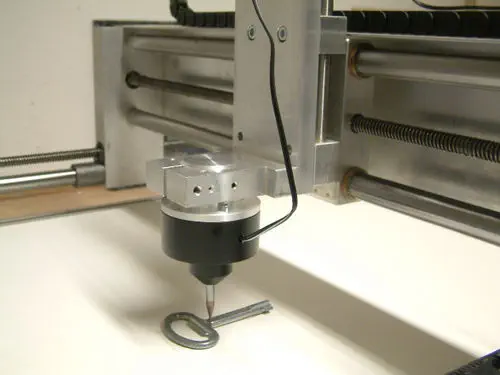
CNC-STEP 1000PRO
3D Scanning and Digitizing for CNC Reproduction Milling