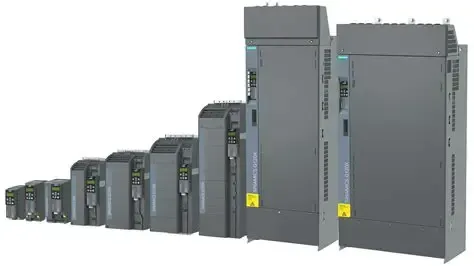
Every SINAMICS G115D distributed drive ships with one of three communication interfaces: terminal I/O control, AS-Interface, or PROFINET. The choice determines not just how you send a speed setpoint — it decides how diagnostics flow back to the PLC, whether you can reconfigure parameters remotely, and how many drives share a single cable run. Pick I/O control for a standalone accumulation zone and you save on network hardware. Pick I/O for a 30-drive coordinated sortation line and you lose visibility into every drive between scheduled maintenance windows.
This guide maps each interface to the conveyor zone types where it makes economic and engineering sense. All three options live on the same G115D hardware platform, so the decision is about the application — not about which drive series to buy.
Terminal I/O Control: The Standalone Workhorse
I/O control means hardwired digital inputs and outputs on a terminal strip inside the drive. You wire a run command to DI0, a speed select bit to DI1, and a fault output to DO0. No network, no bus configuration, no node addressing. The drive behaves like a conventional motor starter with a built-in VFD — it gets its speed reference from a potentiometer or fixed parameter presets, and the only feedback is a relay contact.
This interface fits zones where the drive runs at one or two fixed speeds for its entire service life. Think of a gravity-discharge accumulation conveyor: the drive starts when the upstream photoeye clears, runs at 45 Hz, and stops when the downstream zone is full. There is no speed profiling, no torque sharing with an adjacent drive, and no reason for the PLC to know the DC-link voltage. A single digital output wired to a stack light tells maintenance enough — green means running, red means fault.
The G115D models with terminal I/O — such as the 5.5 kW FSC I/O variant and the 0.55 kW fanless I/O unit — ship with 4 digital inputs, 2 digital outputs, and 1 analog input as standard. Parameters are set once via the USB interface with a laptop, then locked. Day-to-day operation needs no software tools.
The trade-off is visibility. When an I/O-controlled drive trips on overcurrent because a bearing is seizing, the PLC sees a generic fault contact — not the specific alarm code, not the DC-link voltage trend leading up to the trip, not the motor temperature. For a single isolated zone, this is acceptable. For a 200-meter packaging line with 40 drives, it is a troubleshooting blind spot.
AS-Interface: Low-Cost Networking for Simple Zones
AS-Interface (AS-i) is a two-wire fieldbus that carries both power and data on a single unshielded yellow cable. Each AS-i segment supports up to 62 nodes, and the G115D occupies one node as a standard AS-i slave. The PLC sends a speed setpoint as a 16-bit word and reads back speed, current, and fault status over the same two wires. No Ethernet switch, no IP addressing, no managed infrastructure.
The key advantage is cabling cost. AS-i uses insulation displacement connectors — you press the yellow cable into the drive's AS-i module with a screwdriver, and the connector pierces the jacket to make contact. No RJ45 crimping, no shielded connectors, no cable glands. A 100-meter segment with 20 drives costs a fraction of an equivalent PROFINET installation in cable, connectors, and switch ports.
The 1.5 kW AS-Interface G115D and the 7.5 kW AS-Interface model serve zones where you want basic remote speed control and fault diagnostics but do not need high-speed cyclic data or safety integration. Typical applications include diverter stations, lift gates, and incline belt sections — zones that change speed occasionally but run at steady state most of the time.
AS-i is not a high-speed bus. The cycle time for a full segment of 62 nodes runs 5–10 ms, which is adequate for speed reference updates every 50–100 ms but insufficient for multi-axis interpolation or fast torque feedforward. If your zone requires sub-millisecond synchronization with an adjacent drive — for example, two motors pulling the same belt — PROFINET is the next step.
PROFINET: Full Performance for Coordinated Zones
PROFINET connects the G115D as a full participant on an industrial Ethernet network. The drive appears in the Siemens TIA Portal hardware catalog as a standard PROFINET IO device with a configured update cycle as short as 1 ms. The PLC exchanges cyclic process data — speed setpoint, actual speed, torque, current, temperature, alarms — plus acyclic parameter access for remote commissioning and firmware updates. Everything the drive knows, the PLC can read.
The 5.5 kW PROFINET G115D and the 3 kW fanless PROFINET model target zones that need precise speed synchronization, rapid fault response, or integration with a plant-wide PLC architecture. A sorting conveyor with 12 drives running coordinated speed ramps, where the gap between cartons must stay within 50 mm, is a PROFINET application.
PROFINET also enables daisy-chain cabling — each G115D has a built-in 2-port switch, so you connect Drive 1 to Drive 2 to Drive 3 with a single Ethernet cable hop per drive, rather than running 12 home-run cables back to a central switch. Only the first and last drive connect to the switch; the rest pass traffic through. The cabling savings on long conveyor lines can offset the higher per-drive cost of the PROFINET interface.
PROFIsafe: When Safety Travels on the Same Cable
PROFIsafe is not a separate communication variant — it is a safety profile that runs over standard PROFINET. The 0.75 kW PROFIsafe G115D integrates STO (Safe Torque Off) and SS1 (Safe Stop 1) safety functions directly into the drive's PROFINET telegram, eliminating the need for a separate hardwired safety relay and dedicated safety wiring for each drive.
In a conventional setup, every conveyor drive that must stop for an emergency stop circuit requires two contactor coils or a safety relay wired to the STO terminals. With PROFIsafe, the emergency stop signal travels over the same Ethernet cable as the speed setpoint. The drive's internal safety logic executes the stop within the certified SIL 3 safety envelope, and the PLC logs which drive stopped, when, and why — all without additional wiring.
This matters most on long lines where the cost of running separate safety circuits — two conductors per drive, plus safety relays in the cabinet — exceeds the cost of the drives themselves. When you are already running PROFINET for motion control, adding PROFIsafe is a firmware configuration change, not a wiring change.
Decision Framework: Which Interface for Which Zone?
| Zone Type | Recommended Interface | Why |
|---|---|---|
| Standalone accumulation zone, 1–2 fixed speeds | I/O Control | Lowest cost, no network infrastructure needed, fault contact is sufficient |
| Diverter/lift gate with occasional speed changes | AS-Interface | Remote speed control plus basic diagnostics at minimal cabling cost |
| Multi-zone coordinated conveyor, 3+ drives | PROFINET | Sub-millisecond sync, daisy-chain cabling, full parameter access |
| Zone with emergency stop or light curtain integration | PROFINET + PROFIsafe | Safety over the same cable, eliminates per-drive safety relays, SIL 3 certified |
| Retrofit of existing AS-i conveyor segment | AS-Interface | Uses installed AS-i cable infrastructure, no new switch ports |
How many drives can I put on one AS-Interface segment?
A standard AS-i segment supports up to 62 slaves. With G115D drives, each drive consumes one slave address. In practice, limit a conveyor segment to 30–40 drives to keep the AS-i cycle time below 5 ms and leave headroom for I/O modules. If you need more drives, install a second AS-i gateway on the PLC and split into two segments.
Can I mix I/O control and PROFINET drives on the same conveyor line?
Yes. The G115D hardware is identical regardless of interface — the communication variant is a firmware and connector option. A common pattern is PROFINET for the main transport zones where you need diagnostics and speed profiling, and I/O control for simple infeed and outfeed zones. The PLC talks to both, but the I/O drives only send a fault contact while the PROFINET drives stream full telemetry.
The G115D communication choice is an infrastructure decision disguised as a drive decision. Match the interface to the zone's role in the line — not to the drive's power rating — and you optimize for neither the cheapest drive nor the most capable one, but for the lowest total cost of commissioning, troubleshooting, and expanding the line three years later.