Direct answer: PanelView Plus 7 Standard and Performance run the same FactoryTalk View ME software. The difference is hardware: memory, simultaneous controller connections, and alarm or recipe capacity. Choose Standard for single-machine, low-connection jobs. Choose Performance when you need more than 12 connections, on-terminal trending, or 15 to 19 inch panels.
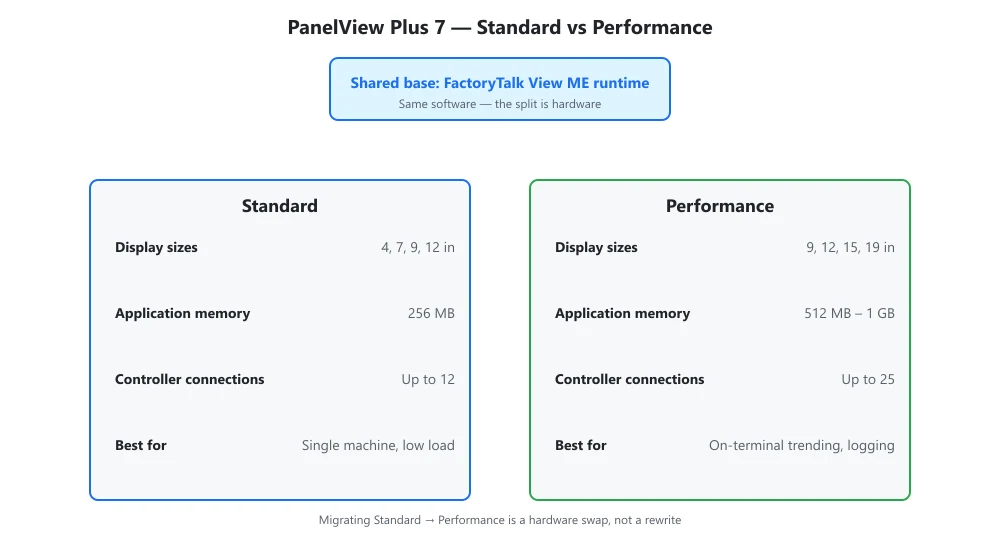
PanelView Plus 7 ships in two hardware tiers, Standard and Performance, both running FactoryTalk View ME on the same terminal family. The split is memory, processing headroom, and how many simultaneous connections and alarm or recipe assets they support, not a different software edition. Pick the tier from your screen count and runtime load, not from marketing.
| Capability | Standard | Performance |
|---|---|---|
| Display sizes | 4, 7, 9, 12 in | 9, 12, 15, 19 in |
| Typical application memory | 256 MB | 512 MB – 1 GB |
| Simultaneous controller connections | Up to 12 | Up to 25 |
| Integrated features | Base alarms, RDP client | Plus data store plus, extended logging |
Choosing between Standard and Performance
When the Standard tier is enough
Standard covers single-machine jobs: 4 to 12 inch panels, up to 12 simultaneous controller connections, 256 MB application memory, and base alarms with an RDP client. Pick it for a standalone HMI on one or two controllers where the screen stays under 12 inches and you do not need on-terminal trending.
When you need Performance
Performance is the call when the application spans 15 to 19 inch panels, needs more than 12 controller connections (up to 25), or relies on on-terminal trending, data store plus, and extended logging. Choose it for line-level HMIs, multiple controllers, and recipes that push past 256 MB.
Selection checklist
- How many screens will the application use? (4 to 12 in favors Standard; 15 to 19 in needs Performance)
- How many controllers must it connect to at once? (up to 12 → Standard; up to 25 → Performance)
- Do you need on-terminal trending, data store plus, or extended logging? (yes → Performance)
Both tiers live in the same HMI and industrial PC family, so migrating a Standard project to a Performance terminal later is a hardware swap, not a rewrite.
PanelView Plus 7 FAQ
Can I upgrade a Standard to Performance in the field?
Yes. Both tiers run the same FactoryTalk View ME project, so moving from a Standard terminal to a Performance terminal is a hardware swap, not a rewrite. You reuse the application file; only the terminal and its memory ceiling change.
Do Standard and Performance share the same configuration software?
Yes. Both are developed in FactoryTalk View Studio (Machine Edition). The project, tags, and screens are portable between tiers, which is why a later Performance upgrade does not force a re-engineering effort.
Related reading: OPC UA and MQTT in industrial HMIs